
Imagine you are playing an MMORPG that has a compass and an x,y coordinate location system. You know the coordinates of a desired location and you pop into the world. How do you get there? You take one step, type /loc (or its equivalent) and get a new set of current coordinates. From that, and some comparisons to your desired location, you decide to run North. But there is a mob between you and where you think you need to go. You run a little to the right, turn back to the left. Okay, now you have to do it again. You know exactly how painful this can be. You also know that its dark and doing all this work while a monster could walk up on your is scary.
Now lets say there was a program you could run that told you which way to face, how far you needed to run to get to a location, and could be regularly updated as you run, regardless of how many times you turn. That is MMONavigator.
https://github.com/johnrigsby1970/MMONavigator/tree/master
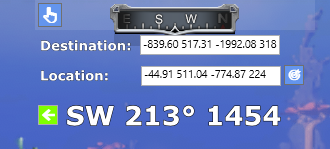
When launches it displays at the top center of the screen. In Pantheon it will wrap itself around the built in compass. It is always on top, so its not part of your game, but running in a way that it shows on your screen.
In settings, enter the destination location. It needs x, y coordinates but was coded to also take the full coordinates that result from Pantheon Rise of the Fallen /loc command. Enter that or just x and y coordinates separated by a space (-839 -1992). Now, it needs your current location. You can manually enter that, but for use with Pantheon, just type /loc. There you go, run Southwest for 1445 meters. Since /loc gives your current facing as the last number (in Pantheon), it tells you to turn a little right.

Now that you have your destination entered, you can close settings and have a more streamlined view. As you move, keep pressing /loc. If you have a macro, just keep pressing the button as you run.
No, it is not packet sniffing. Its watching your system clipboard, which is where Pantheon writes the coordinates anytime you enter the /loc command. If you want, you can type everything in manually. It can be used with any x,y coordinate system. So don’t worry about violating any terms. This just saves you calculating this information on your own.
The program is available on GitHub.
Download the zip file from the code button. You’ll find a published version of the code in MMONavigator-master\bin\Release\net8.0-windows\publish. Run MMONavigator.exe. When you do, you will get a prompt not to run it. Choose More info and “Run anyway”. Yes, you have the option not to trust me and just inspect the code and compile it yourself.
It is free, but I would appreciate it if you would donate to helping me make providing tools like this an option as a living, or at least buy me a coffee.